Moov SmartStep V1, V2 or V3 - Technical specifications

What's in the SmartStep box?

In the SmartStep package you’ll find:

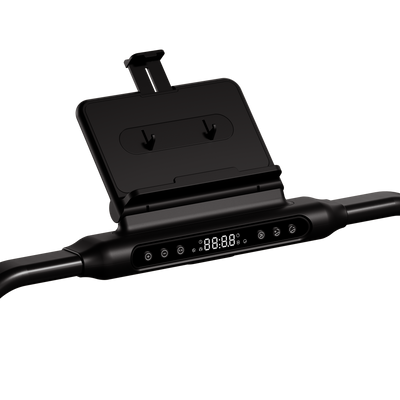
  • The basics: treadmill (frame, running belt and handle);
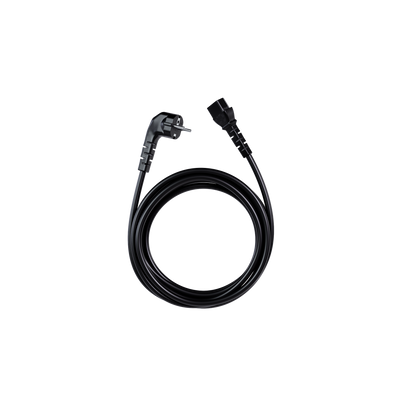
  • Accessories: iPad holder, cup holder, remote control (incl. CR2025 battery), power cable (2m) and the red safety lanyard with magnet;
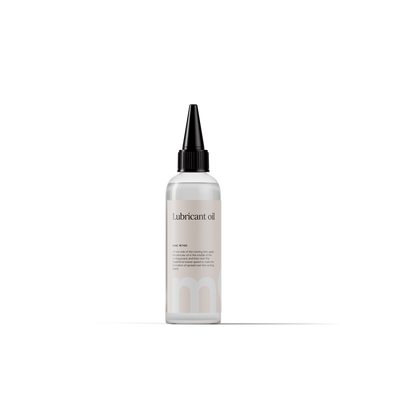
  • Maintenance & assembly: manual, a small bottle of lubricant and two Allen keys (5mm for the iPad holder and 6mm for belt tension).

Can I plug the SmartStep into any outlet?

The SmartStep must always be connected to a grounded (3-pin) outlet. Use only the original power cable and plug it directly into the wall to prevent interference and protect the motor.

How do I start and stop my SmartStep?

Starting:

  1. Check that the safety cord is attached (magnet in the yellow position);
  2. Set the front power switch to 'ON';
  3. Press START on the panel or the remote;
  4. The treadmill starts slowly.

Stopping:

  1. Press STOP on the panel or the remote;
  2. The treadmill slows down gradually and stops;
  3. Set the power switch to 'OFF' when you’re finished.

Emergency stop? Then pull the safety cord out of the panel so the treadmill stops immediately.

How do I install the SmartStep?

The SmartStep is designed for a quick start. You'll be ready to move in under 5 minutes:

  1. Stand the treadmill upright (motor side down) and firmly tighten the front footrests;
  2. Pull the latch on the right bar out, fold the handle up, and let the latch fall back to lock it;
  3. Attach the iPad holder to the panel with the three screws and the 5mm Allen key. Snap the cup holder onto the right side of the handle;
  4. Place the magnet from the red safety cord on the yellow mark on the control panel. The belt won’t start without this contact;
  5. Plug into the power outlet and set the front on/off switch to 'ON'.

The supplied power cable is too short for where I want to place my SmartStep – what can I do?

Because a treadmill draws a lot of power, we advise against using power strips or extension cords. For a safe, direct connection, we also offer longer power cables of 3 and 4 metres.

How do I set the speed on my SmartStep?

The speed is adjustable from 1 to 12 km/h and can be changed using the + or – buttons on the panel, or the speed buttons on the remote. Speed increases or decreases in 0.1 km/h steps. Tip: always start at a low speed and build up gradually.

What's the difference between walk mode and run mode on my SmartStep?

How long can I train per session on my SmartStep?

How long you train per session affects the lifespan of your SmartStep. Tip: after heavy use, let the treadmill cool down for at least 15 to 20 minutes before folding it.

  • Walking mode (0-6 km/h): more 60 minutes
  • Running mode (6-12 km/h): more 40 minutes

What data do I see on my SmartStep display?

The LED screen automatically cycles every 5 seconds through steps, speed (km/h), time, distance (km) and calories (kcal).

How do I connect my phone to my SmartStep via Bluetooth for audio?

Put the treadmill in standby and hold the minus (-) button on the panel or remote. Then search for the treadmill on your phone and select it.

How do I set the incline on my SmartStep V3?

The incline is automatically adjustable up to 15%. Use the incline buttons on the console or on the remote to set your desired level.

Up to what weight can I use my SmartStep?

Our treadmills are optimised for users up to 120 kg. Use is often possible up to 130 kg, but we recommend limiting speed to a more of 6 km/h and sessions to 30 minutes at a time. This helps you stay active safely and comfortably.

Why is there a diagonal line on my SmartStep belt?

Wondering about the stripe on the belt? No worries, that's completely normal. It's the seam where the treadmill belt was joined during production. This lets the belt run smoothly around your machine.

The handrail on my SmartStep feels too far forward – what can I do?

The hand support is indeed set a little further away and isn’t adjustable. We understand this can take some getting used to and you may want more grip while walking. That's why we've updated this in our new Moov models.

Here are a few tips other SmartStep users find helpful:

  • Resistance band or towel: je kunt een (lichte) weerstandsband of stevige handdoek aan de handgreep vastmaken. Zo heb je iets om vast te houden dat dichter bij je lichaam zit, zonder dat je naar voren hoeft te leunen.
  • Placement near a wall or table: sommige gebruikers zetten de loopband bewust dicht bij een muur of stabiel meubel. Zo kun je met één hand steun zoeken op de juiste hoogte, zonder dat je houding eronder lijdt.

External support: als je zelf handig bent of zo iemand in je buurt hebt, kun je overwegen om een simpele stang of beugel aan de muur te monteren. Dat geeft je extra houvast, precies waar jij het nodig hebt.


Didn't find
what you were looking for?

We're here with information, support, and genuine care. Choose the step that fits your question.

Email

Share your question or situation with us in as much detail as you like.

Chat

Get speedy answers to your questions anytime.

Call

Monday to Friday between 09:00 and 13:00.